The short answer
The design history file (DHF) holds the records that show a device was designed under design controls. Since the FDA's Quality Management System Regulation took effect on 2 February 2026, the term is gone: the QMSR incorporates ISO 13485:2016, whose clause 7.3.10 requires a design and development file that contains or references all records needed to show the design requirements were met. In Jira and Confluence, keep the records where they are created: requirements, reviews, tests and changes in Jira, plans and design documents in Confluence. Make the file itself a Confluence index that references them, and freeze a copy at each release.
Who is this for?
This guide is for quality leads, heads of software and engineering leads at medical device software teams that run their development in Jira and Confluence, or plan to. It answers two questions that come up before every audit: where is our design history file, and how do we keep it current without a document sprint at the end of each release?
It doesn’t replace your quality lead’s reading of the regulations. We’re an Atlassian consulting firm, not a regulatory consultancy; this guide shows how to hold the records your process requires so they are easy to find and show.
The example
The screens come from a sample space on our test site. It belongs to a fictional team of about 20 people building a remote monitoring app: patients at home measure oxygen saturation and pulse with a Bluetooth oximeter, and hospital nurses see the readings on a dashboard with alerts. The team’s quality lead classified the software as IEC 62304 class B. Release 2.4 is in progress, and clinicians asked for alert limits per patient instead of per ward. The same team is the worked example in our traceability guide and our guide to using Jira for medical device software. All names, dates and numbers are made up.
What is the design history file called now?
“Design history file” comes from the FDA’s old Quality System Regulation (21 CFR 820.30). That changed on 2 February 2026, when the FDA’s Quality Management System Regulation (QMSR) took effect. The QMSR incorporates ISO 13485:2016 by reference, and the FDA’s final rule explains that it no longer keeps separate requirements or terms for the DHF, the device master record (DMR) and the device history record (DHR).
| Old FDA term | What it held | Under the QMSR and ISO 13485 |
|---|---|---|
| Design history file (DHF) | Records of the design process | Design and development file, clause 7.3.10: contains or references all records needed to show the design and development requirements were met |
| Device master record (DMR) | Specifications and procedures to make the device | Medical device file, clause 4.2.3 |
| Device history record (DHR) | Records of each production batch or unit | Medical device or batch record, clause 7.5.1 |
The FDA describes the design and development file as consistent with the former DHF. In practice, the records are the same; what changed is the name and the reference point. Many teams, and most search engines, still say DHF, so this guide uses both.
What do design controls ask you to record?
ISO 13485 clause 7.3 covers design and development from planning to changes. For a software product, each part produces records that already exist in a well-run Jira and Confluence setup. This is how we map them; the clause topics come from ISO 13485, the “where” is our practice.
| ISO 13485 | Design control | Typical records | Where we keep them |
|---|---|---|---|
| 7.3.2 | Planning | Development plan per release, responsibilities, review points | Confluence page, approved |
| 7.3.3 | Inputs | User needs, requirements, risk control requirements | Jira work types, in the release |
| 7.3.4 | Outputs | Architecture, detailed design, released build, SOUP list (third-party software of unknown provenance) | Confluence pages; Git; Jira SOUP items |
| 7.3.5 | Review | Who reviewed which stage, what, the decision, actions | Jira Design review work items |
| 7.3.6 | Verification | Tests and results against requirements | Jira tests linked “verifies”; release traceability page |
| 7.3.7 | Validation | Usability and clinical evaluation against user needs | Confluence report, approved |
| 7.3.8 | Transfer | Release and deployment checks | Confluence checklist per release |
| 7.3.9 | Changes | Change requests, impact, re-verification | Jira Change request work items, linked |
| 7.3.10 | The file | An index that contains or references all of the above | Confluence index page, frozen per release |
Risk management under ISO 14971 runs alongside: hazards and risk controls in Jira, the risk management plan and report in Confluence.
Why an index, not a folder of copies?
The old picture of a DHF is a binder, or a shared drive folder, with copies of every document. Copies drift. The requirement in the folder says one thing, the one in Jira says another, and an auditor finds both.
Clause 7.3.10 allows the file to contain or reference the records. That makes an index the natural form in Jira and Confluence: one page that lists every element of design control, says where its records live and links to them. Each record keeps one home, its own history and its own approval.
Two rules make the index work:
- Every record has one home. A requirement lives in Jira, not also in a Confluence table. A design document lives in Confluence, not also attached to a Jira work item.
- The index is controlled. It has an owner, it’s reviewed at every design review, and a copy is frozen at every release.
How do you set up the design and development file in Confluence?
Our example team keeps one index page per product in its Confluence space. Each row is one element of design control: the ISO 13485 clause, where the records live, and a link to them. Links to Jira point at saved searches, so the row stays current as work items are added.
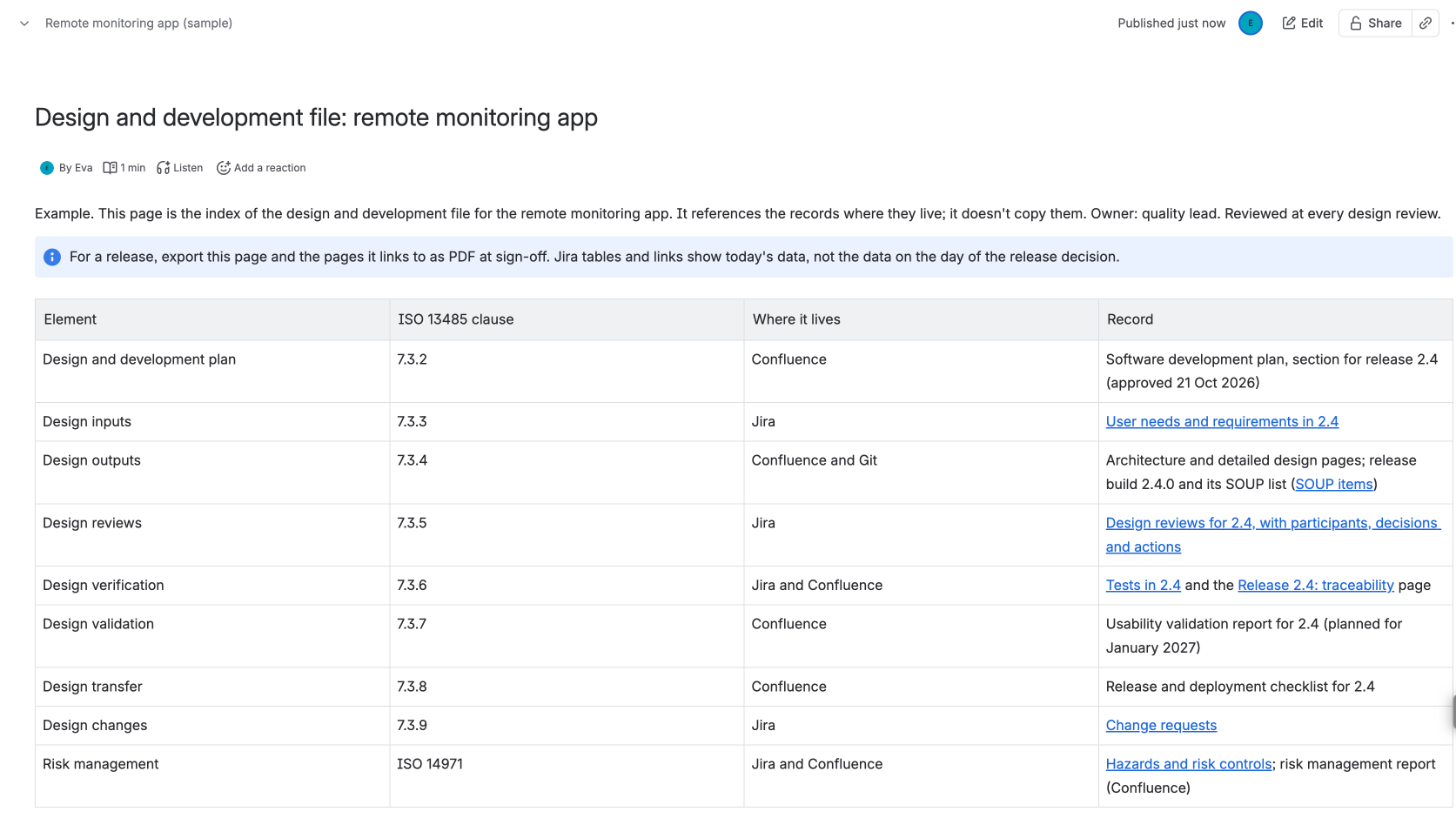 Example: the design and development file as an index. Each row links to the records in Jira or Confluence; nothing is copied.
To set it up:
- One index page per product, in the product’s Confluence space, owned by the quality lead.
- One row per element of design control, with the clause, where the records live and a link. Leave a row in even when the record is still planned, so the gap is visible.
- Links to saved searches, not to single work items, for anything that grows during a release: requirements, tests, reviews, changes.
- A note on freezing. Jira links and Jira tables in Confluence show today’s data, even in an old page version. At sign-off, export the index and the records it links to as PDF and store them with the release, or use an app that captures the content at approval.
- The index under document control, like any other controlled page: see how to control documents in Confluence.
How do you record design reviews in Jira?
ISO 13485 clause 7.3.5 asks for design reviews at planned stages, with records of the results and the actions. The FDA’s final rule for the QMSR quotes the clause as requiring representatives of the functions concerned with the stage under review and other specialist personnel. It also notes that the QMSR doesn’t carry over the old rule’s explicit requirement for a reviewer without direct responsibility for the stage; manufacturers choose who to include.
Our example team records each review as a Design review work item in Jira:
- Stage reviewed: what was under review, for example the design inputs for release 2.4.
- Participants: by role, including the functions concerned and anyone independent of the stage.
- Reviewed: the requirements, changes and risk analysis that were on the table, linked.
- Decision: approved, approved with actions, or not approved.
- Actions: each one its own work item, linked with “led to”, so it can’t be forgotten in the meeting notes.
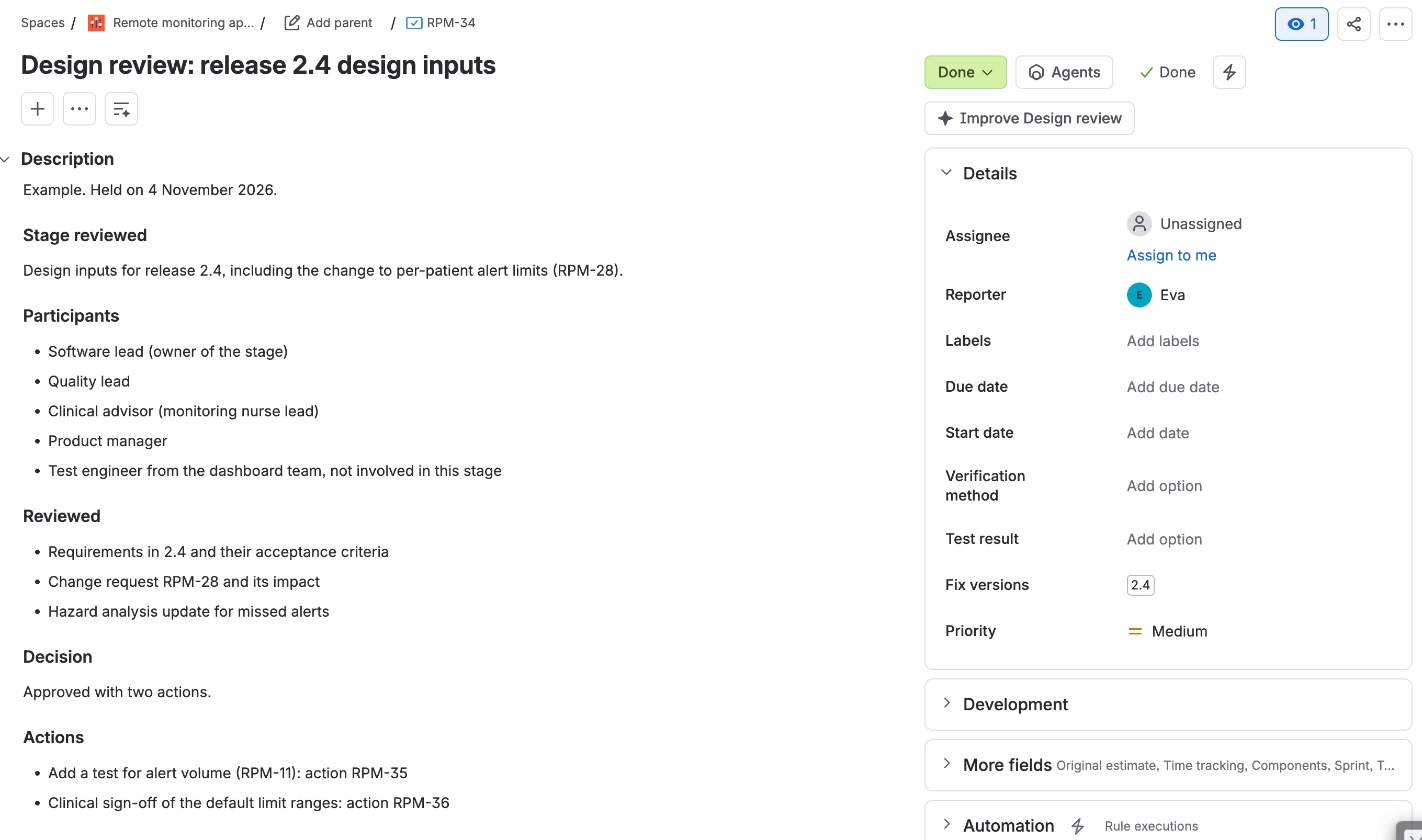 Example: a design review as a work item. Participants by role, what was reviewed, the decision and the actions, each action tracked separately.
The next review is already planned as a work item with a due date: verification results for 2.4, in January, before the release decision.
How do changes reach the file?
Design changes are where design files usually go stale. A requirement changes in a sprint, the test changes with it, and the documents catch up weeks later, if at all.
In our example, the change to per-patient limits is a Change request work item. It records the reason and the approval and links to everything it affects: the requirement, its two tests and the hazard of a missed alert. Because the index links to the change request search, the change is part of the file the moment it is created.
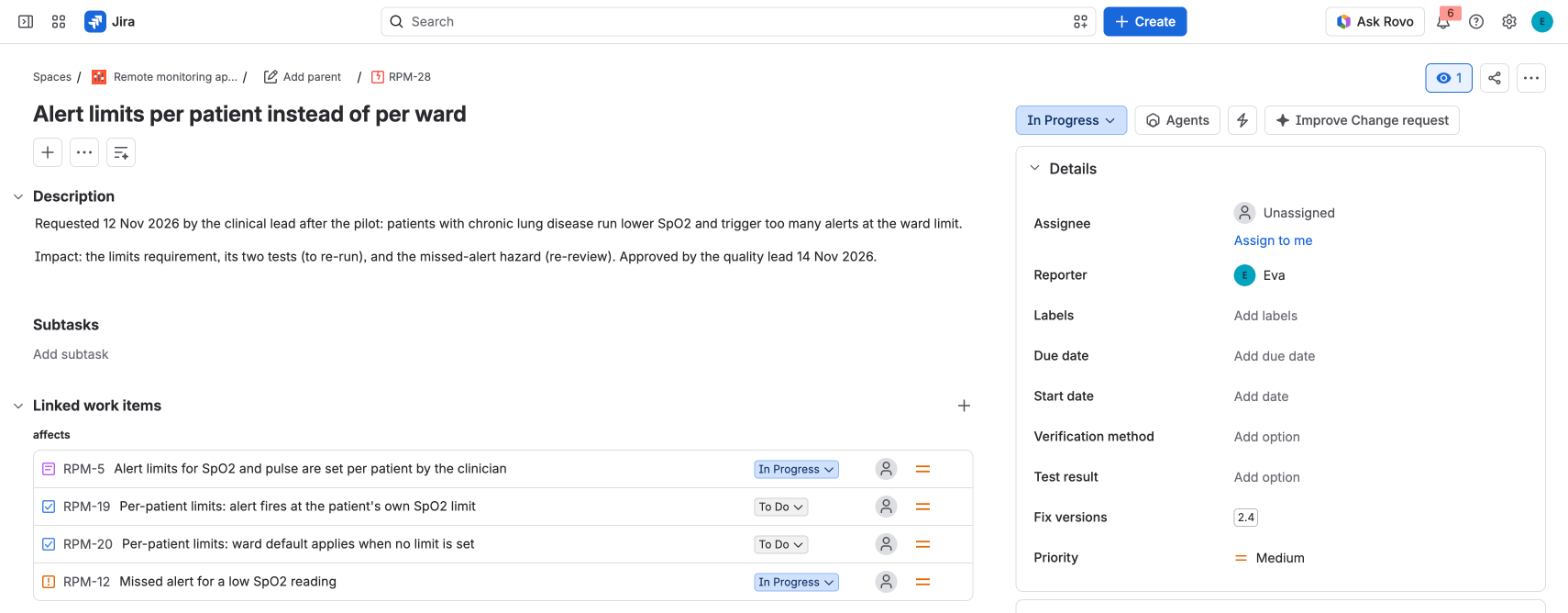 Example: one change request, linked to everything it affects, and through the index part of the design file.
ISO 13485 clause 7.3.9 asks you to review changes for their effect on the device and on parts already delivered, and to verify, validate and approve them as appropriate. The links give the review its starting point; the decision and the approval are still people’s work, recorded on the change request.
Which searches keep the file honest?
Before each design review and each release, a few saved searches show what’s missing. These were run on our sample space:
| Question | Search (JQL) |
|---|---|
| Which design reviews exist for this product? | project = RPM AND issuetype = "Design review" ORDER BY created |
| Which actions from a review are still open? | issue in linkedIssues(RPM-34, "led to") AND statusCategory != Done |
| What are the design inputs in this release? | project = RPM AND issuetype in ("User need", Requirement) AND fixVersion = "2.4" |
| Which requirements have no verification yet? | project = RPM AND type = Requirement AND fixVersion = "2.4" AND (issueLinkType is EMPTY OR issueLinkType not in ("is verified by")) |
| Which design changes are in this release? | project = RPM AND issuetype = "Change request" AND fixVersion = "2.4" |
In our example, the open-actions search returns the two actions from the input review, one in progress and one not started. The verification search returns the alert-volume requirement, which is exactly what the first action is about. The review, the action and the gap are connected, and the next review can check that the loop closed.
How do you freeze the file for a release?
A release needs a record of the design as it was approved, not as it is today. Jira work items keep changing after a release; that’s their job.
Our example team does three things at sign-off:
- Ties every record to the release with the fix version, so the scope of 2.4 is fixed.
- Exports the index and its linked records (the release traceability page, the review records, the test results) as PDF, and stores them in the controlled release folder.
- Records the approval of the release decision on the final design review, with the frozen file referenced.
If your team signs records electronically and Part 11 applies, the approval goes through the e-signature app your quality lead chose. The guide to using Jira for medical device software covers that question.
What goes wrong most often?
- The file is a folder of copies. Two versions of the same requirement exist, and nobody knows which one was approved.
- Reviews are meeting notes. Who attended and what was decided is in a page nobody links to; the actions live in someone’s inbox.
- The file is assembled at the end. A two-week document sprint before the audit, every time, instead of an index kept current.
- Nothing is frozen. The “release record” is a live page that shows today’s data, so it can’t show what was approved.
- The old terms stay in the procedures. SOPs still say DHF, DMR and DHR without saying what they now mean under the QMSR. Updating the terms is a small change; your quality lead decides how.
Who owns what?
Your quality or regulatory lead owns the design control procedure, decides what the design and development file must contain for your product, chairs or approves design reviews and signs off releases. Lottusa is an Atlassian consulting firm, not a regulatory consultancy: we set up Jira and Confluence so the records your procedure calls for are created where the work happens, linked, and easy to show.
Sources
- FDA, Quality Management System Regulation (effective 2 February 2026; incorporates ISO 13485:2016 by reference).
- FDA, Medical Devices; Quality System Regulation Amendments, final rule, Federal Register, 2 February 2024: responses on DHF, DMR and DHR terms (clauses 7.3.10, 4.2.3, 7.5.1) and on design review (clause 7.3.5).
- ISO 13485:2016, clause 7.3 (design and development).
- Atlassian, JQL functions, checked 25 November 2026. Every search in this guide was run on our sample space the same day.
The SaMD Traceability Check: 18 questions, about six minutes, your score right away.
Questions people ask
Is the design history file still required?
The records are; the name has changed in the US. The FDA's QMSR, effective 2 February 2026, eliminated the separate DHF, DMR and DHR terms. FDA's final rule says ISO 13485 clause 7.3.10 requires a design and development file that contains or references all records needed to show conformity with design and development requirements, which FDA describes as consistent with the former DHF.
What replaced the DMR and DHR?
According to the FDA's final rule, content that used to be in the device master record now sits in the medical device file (ISO 13485 clause 4.2.3), and much of what was in the device history record is required in the medical device or batch record (clause 7.5.1).
Does a design review need an independent reviewer?
The old FDA rule (21 CFR 820.30(e)) required one. The FDA's final rule for the QMSR says it doesn't carry over that explicit requirement; ISO 13485 clause 7.3.5 requires representatives of the functions concerned with the stage and other specialist personnel, and manufacturers choose who to include. Including someone without direct responsibility for the stage is still good practice, and easy to record.
Can the design and development file live in Confluence?
Yes, as long as it is controlled: approved, versioned, and frozen for each release. Confluence works well as the index that references records in Jira and in other pages. Because Jira tables and links in Confluence show live data, export the index and its linked records at sign-off, or use an app that captures the content at approval.
Do we need a separate document management system?
Not always. Jira and Confluence, with an approval or e-signature app for controlled documents, can hold design controls for a small team. Teams with many products, heavy supplier documentation or strict Part 11 needs sometimes add a dedicated eQMS. The test is whether you can show any record, its approval and its history quickly.