The short answer
Yes. No medical device standard prescribes a tool: IEC 62304, ISO 13485 and the FDA's Quality Management System Regulation say what your process must do and what records must exist. Jira can hold the software plan, requirements, risk controls, tests, changes and their links, with a history of every change. What it doesn't do on its own is enforce required links, sign records electronically or freeze a released record. Those need a workflow rule, an app or a procedure, and the way you use Jira needs to be validated.
Who is this for?
This guide is for heads of software, engineering leads and quality leads at teams that build software as a medical device (SaMD) or software inside a device, and who either already run Jira or are deciding whether to. It answers the question an auditor, an investor or a new quality lead tends to ask first: can this tool carry our medical device work? It doesn’t replace your quality lead’s reading of the standards.
The example
The screens come from a sample space on our test site. It belongs to a fictional team of about 20 people building a remote monitoring app: patients at home measure oxygen saturation and pulse with a Bluetooth oximeter, a phone app sends the readings to a cloud service, and hospital nurses see them on a dashboard with alerts. The team’s quality lead classified the software as IEC 62304 safety class B. Release 2.4 is in progress, and clinicians have just asked for alert limits per patient instead of per ward. The same team is the worked example in our Jira traceability matrix guide. All names, dates and numbers are made up.
Does any standard require or forbid a tool?
No. The standards and regulations that apply to medical device software describe outcomes, processes and records:
| Source | What it asks for | What it says about tools |
|---|---|---|
| IEC 62304 | Software life cycle processes: planning, requirements, architecture, verification, release, maintenance, risk management, configuration and problem resolution; more activities for higher safety classes | Requires the processes and their records, not a particular tool |
| ISO 13485:2016 | A quality management system, including design and development controls and document and record control | Clause 4.1.6: software used in the quality management system must be validated for its intended use |
| FDA QMSR (21 CFR Part 820) | In force since 2 February 2026; incorporates ISO 13485 by reference | Same validation expectation as ISO 13485; the FDA’s Computer Software Assurance guidance explains a risk-based way to do it |
| 21 CFR Part 11 | Controls for electronic records and electronic signatures that replace paper ones for FDA-required records | Applies to the system and procedures, not to a product label |
So the real question isn’t “is Jira allowed?” It is “can we show that our process works, with the records in Jira, and that we checked Jira does what we rely on it for?”
Which records belong in Jira, and which in Confluence?
Jira is good at items that change status and link to each other. Confluence is good at documents people read from top to bottom and approve as a whole. A sensible split follows that line. This is the one we use:
| Record | Where it lives | Why there |
|---|---|---|
| Software development plan | Confluence, one page per product, updated per release | Read and approved as a document |
| User needs, requirements | Jira work types | Each one changes status, gets tested and is linked |
| Architecture, detailed design | Confluence pages, linked to the requirements they cover | Diagrams and reasoning, reviewed as a whole |
| Hazards, risk controls | Jira work types; the risk management file summary in Confluence | Items link to requirements and tests; the summary is approved |
| Tests and results | Jira (a Test work type or a test management app) | Results per release, linked to what they verify |
| SOUP list | Jira SOUP item work type | Versions and known anomalies change; each links to the risks it touches |
| Problem reports, change requests | Jira | They move through a workflow and affect other items |
| Release record | Confluence page per release, frozen at sign-off | The approved snapshot an auditor reads |
| SOPs, work instructions | Confluence with an approval workflow | Controlled documents |
The point of the split is that every record has one home. A requirement written in a Confluence table and again as a Jira work item will drift, and the auditor will find the version that disagrees.
What does Jira do well for medical device software?
Most of what IEC 62304 asks you to keep is a set of connected records that change over time. That is what Jira is built for.
| What you need | How Jira holds it |
|---|---|
| A software development plan per release | A release (fix version) per software version, with the plan in a linked Confluence page |
| Requirements with stable IDs | A Requirement work type; each work item keeps its key unless it is moved to another space |
| Risk controls and their verification | Hazard and Risk control work types, linked to the requirements and tests that implement and verify them |
| Traceability | Link types named by meaning (satisfies, mitigates, is verified by), searchable with JQL |
| Change control | A Change request work type, linked to everything it affects |
| Problem reports | Bugs with a severity and a link to the release they were found in and fixed in |
| Who changed what, and when | The History tab on every work item; the audit log for configuration changes |
| Access by role | Space roles and permission schemes |
The changed requirement in our example shows most of this on one screen: two tests verify it, a story builds it, it satisfies a user need, and its history records each change with the person and the time.
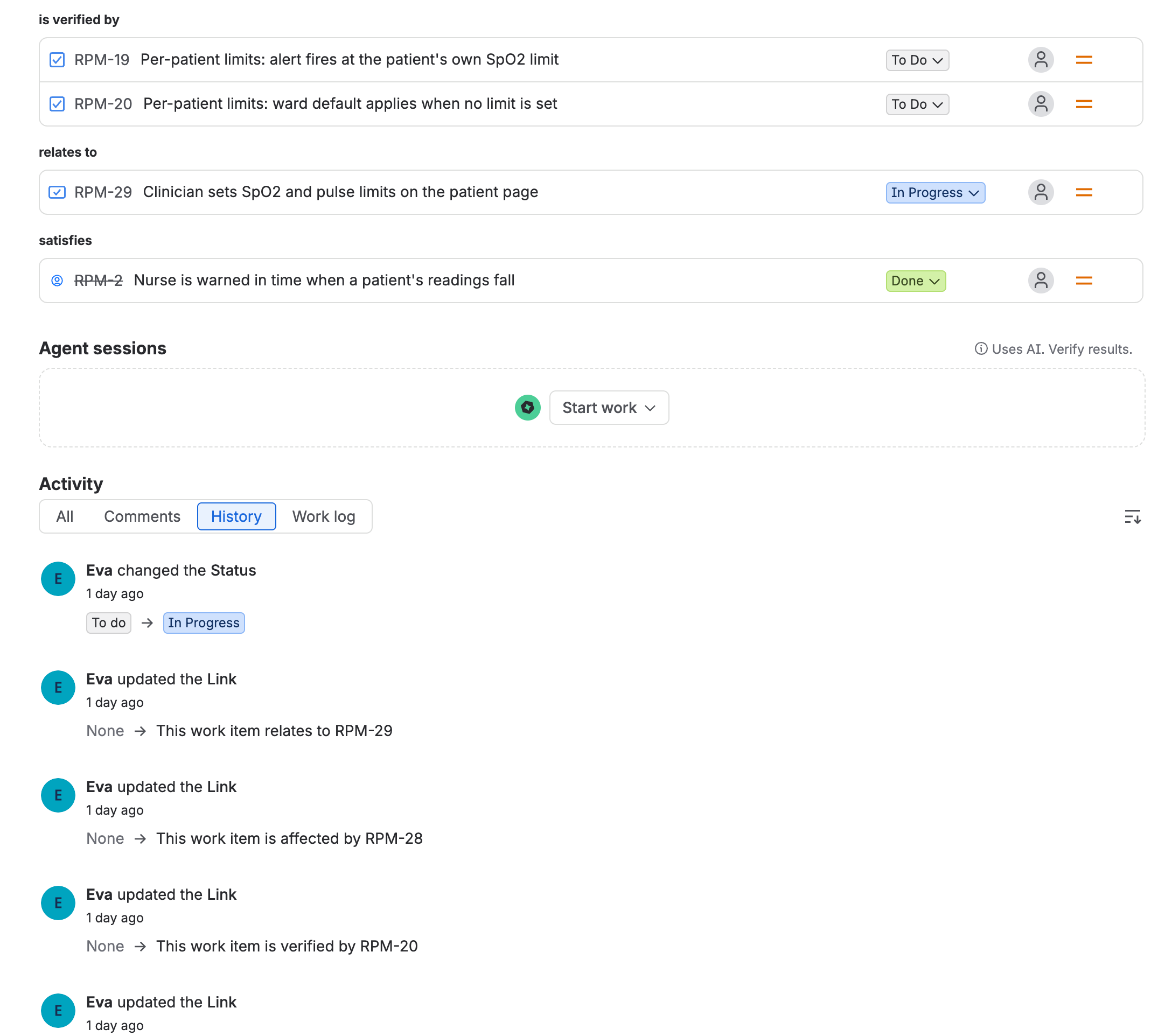 Example: the changed requirement, its links, and the History tab with every change.
The change request that triggered it lists what has to be re-checked: the requirement, its two tests and the hazard of a missed alert.
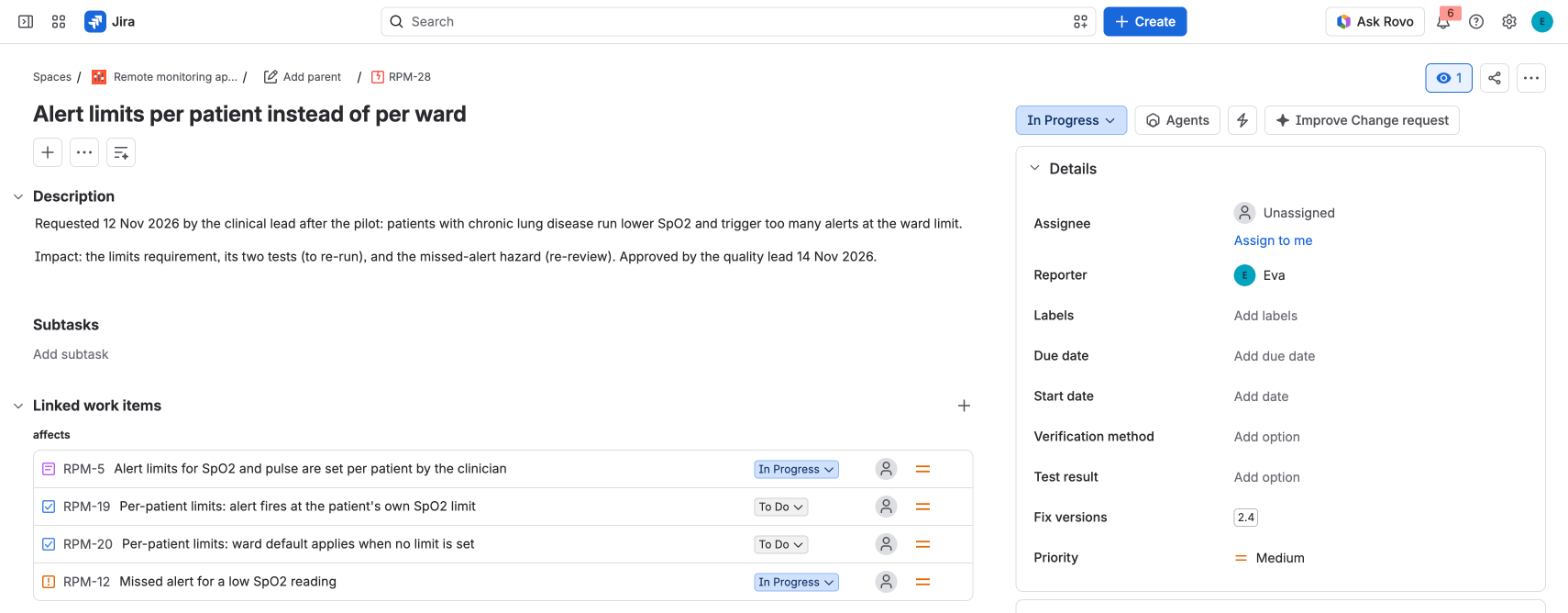 Example: one change request, linked to everything it affects.
For the configuration itself, Jira Cloud keeps an audit log of changes such as permission schemes, workflows, screens and custom fields. Atlassian’s documentation says you need the Administer Jira global permission to see it, and that it isn’t available when all your Jira Cloud apps are on the Free plan.
What doesn’t Jira do on its own?
These are the gaps we see auditors and quality leads ask about. Each has a known answer; none is a reason to avoid Jira.
| Gap | Why it matters | The usual answer |
|---|---|---|
| Required links aren’t enforced | A requirement can reach Done with no test linked | A workflow app that checks links on the transition; or a saved gap filter reviewed before every release |
| No electronic signature with a stated meaning | Approvals of FDA-required records may fall under Part 11 | An e-signature or approval app from the Atlassian Marketplace, if your quality lead decides Part 11 applies |
| No frozen release record | A Jira table in Confluence is a live query; even an old page version shows today’s data | Export the approved record to PDF at sign-off, or use an app that captures content at approval |
| Continuous change in Cloud | A validated configuration can behave differently after an update | A short re-check after relevant changes, based on your risk assessment |
| Free text everywhere | Fields nobody fills in make the record useless | Required fields on the transitions that matter, and few of them |
Jira Cloud’s built-in validators can require a field before a transition, but none checks for a link of a given type. We say this plainly because it is the gap teams most often assume Jira already covers.
How do you answer an auditor’s questions from Jira?
An audit of a software release usually comes down to a handful of questions. If each one has a saved search, the answer takes a minute instead of a week of spreadsheet work. These searches were run on our sample space; replace the space key and release name with yours.
| Question | Search (JQL) |
|---|---|
| What changed in this release, and why? | project = RPM AND issuetype = "Change request" AND fixVersion = "2.4" |
| Are all risk controls for this release done? | project = RPM AND issuetype = "Risk control" AND fixVersion = "2.4" AND statusCategory != Done |
| Which known problems are still open at release? | project = RPM AND issuetype = Bug AND statusCategory != Done |
| Which third-party components (SOUP) are in use? | project = RPM AND issuetype = "SOUP item" |
| Which requirements changed status in the last 30 days? | project = RPM AND issuetype = Requirement AND status CHANGED AFTER -30d |
| Which requirements have no test yet? | See the gap search in the traceability guide |
In our example, the risk control search returns two items still open for 2.4: the reconnect check after the phone wakes, and the stale-data marker. That is exactly what the release review should discuss before anyone signs.
The last row matters most. Jira can’t stop a requirement from closing without a test, but a gap search reviewed before every release finds it. The open-bug search is also the starting point for the list of known residual anomalies that IEC 62304 asks you to document for a release; your team still decides which ones to list and why they are acceptable.
How do you handle problem reports?
IEC 62304 has a software problem resolution process (clause 9): problems are reported, investigated, evaluated for their effect on safety, resolved and verified, with records of each step. In Jira that maps onto a Bug workflow with a few deliberate steps:
- Reported, with the release it was found in (the Affects versions field) and how it was found.
- Investigated, with the cause and the other releases or items it affects, linked.
- Evaluated, with a field or a short note on whether it is safety-relevant, and links to any hazard it touches.
- Resolved, fixed in a named release (the Fix versions field) or deferred with a written reason.
- Verified, with a linked test or a note on how the fix was checked.
The workflow doesn’t need to be long. It needs the evaluation step to exist, so that “is this a safety problem?” is answered on the record, not in a hallway. If a problem leads to a design change, it gets a change request, linked to the bug and to everything the change affects, as in the example above.
Does Jira need to be validated?
If Jira holds records for your quality management system, yes. ISO 13485 clause 4.1.6 asks you to validate the application of computer software used in the quality management system, before initial use and after changes, with an approach proportionate to the risk. The FDA’s QMSR, in force since 2 February 2026, incorporates ISO 13485 by reference, and the FDA’s Computer Software Assurance guidance, issued in final form in September 2025 and updated for the QMSR in February 2026, describes a risk-based approach focused on intended use.
In practice that means validating how you use Jira, not Jira in general:
- Write down the intended use. Which records live in Jira, which in Confluence, which elsewhere.
- Assess the risk of each use. A broken traceability search before a release matters more than a board color.
- Test the configuration you rely on. Work types, required fields, link types, workflow rules, the saved searches you use as release evidence.
- Keep the evidence with the date and the configuration it covers.
- Plan the re-check. Decide what kind of change, by Atlassian or by your own admins, triggers a new check.
Your quality lead decides the depth. Our part is to make the configuration small and stable enough that checking it is quick.
How do you set it up?
This is how we set up Jira for SaMD teams. It is our practice, not an Atlassian template.
- One company-managed space per product, so the work types, fields and workflows are controlled by an admin, not changed per team.
- Work types for the records, not only the work: User need, Requirement, Hazard, Risk control, Test, Change request, SOUP item, next to Epic, Story and Bug. Requirements are not stories; a story closes, a requirement stays.
- Link types named by meaning, both directions: satisfies, mitigates, is verified by, affects. “Relates to” can’t be reported on.
- A release per software version, with every requirement, test result and risk control tied to it.
- Few required fields, on the transitions that matter: for example, a verification method before a requirement can be approved.
- Saved searches as release evidence: requirements without a test, open risk controls, changes since the last release. The traceability guide has the tested JQL.
- Controlled documents in Confluence, with an approval workflow; see how to control documents in Confluence.
- A one-page “how we use Jira” procedure, which is also the base of your validation.
What goes wrong most often?
- The setup grows field by field. Every audit finding adds a custom field, and two years later nobody fills in half of them.
- Stories are used as requirements. When the story closes, the requirement disappears with it.
- “Relates to” for everything. The links exist, but no report can tell a test from a dependency.
- Validation is done once. The first validation is thorough; the changes after it are never checked.
- The tool is blamed for a process gap. If nobody owns the release review, no configuration fixes it.
Who owns what?
Your quality or regulatory lead owns the interpretation of IEC 62304, ISO 13485 and Part 11 for your product, the safety class, the validation decision and the release sign-off. Lottusa is an Atlassian consulting firm, not a regulatory consultancy: we design and build the Jira and Confluence setup around the decisions your team makes, so the evidence is easy to produce and easy to show.
Sources
- IEC 62304:2006 with Amendment 1:2015; requirements by safety class as summarized by the Johner Institute.
- ISO 13485:2016, clause 4.1.6.
- FDA, Quality Management System Regulation (21 CFR Part 820, effective 2 February 2026).
- FDA, Computer Software Assurance for Production and Quality Management System Software (updated February 2026).
- FDA, Part 11, Electronic Records; Electronic Signatures: Scope and Application (September 2003).
- Atlassian, Audit activities in Jira and workflow rule types, checked 24 November 2026.
The SaMD Traceability Check: 18 questions, about six minutes, your score right away.
Questions people ask
Is Jira FDA approved or IEC 62304 certified?
No, and no tool is. The FDA doesn't approve development tools, and IEC 62304 applies to your software life cycle processes, not to the products you use. What an auditor looks at is your process, your records and how you validated the tools you rely on for them.
Does Jira need to be validated?
If it holds records for your quality management system, yes. ISO 13485 clause 4.1.6 asks you to validate computer software used in the quality management system for its intended use, before first use and after changes, with effort proportionate to the risk. You validate how you use Jira, not Jira in general. The FDA's Computer Software Assurance guidance describes a similar risk-based approach.
Is Jira 21 CFR Part 11 compliant?
No tool is Part 11 compliant on its own; Part 11 covers the whole system, including your procedures. Jira on its own has no electronic signature with a stated meaning and re-authentication at signing. If you sign FDA-required records electronically in Jira or Confluence, you need an app that adds those features, and your quality lead decides which records Part 11 applies to.
Should we use Jira Cloud or Data Center?
Both are used by medical device teams. The practical difference for validation is change: Atlassian updates Cloud continuously, so plan how you re-check your setup after changes instead of validating once. Data Center lets you choose when to upgrade, at the cost of running it yourself.
Do we need a separate requirements management tool?
Not necessarily. If requirements are their own work type with stable IDs, testable criteria and links to tests and risk controls, Jira is often enough. Teams with very large requirement sets or heavy reuse across products sometimes add a dedicated app on top of Jira.