The short answer
Keep the disciplines in one company-managed Jira space and split them with components, not with separate spaces. Give each rhythm its own board: a Kanban board for electronics, mechanical and test work, which moves in weeks, and a Scrum board for firmware and app work, which runs in sprints. Both boards share the same builds as releases, so a late board revision or tool shows up against the firmware that waits for it.
Who is this for?
This guide is for engineering leads, heads of hardware and program managers at teams that build a physical product with firmware and software in it, and who plan in Jira or want to. It answers one practical question: how do you put electronics, firmware, mechanical, test and app work in Jira so that each discipline can work its own way, and everyone still sees what the next build is waiting for?
The example
The screens in this guide come from a sample space on our test site. It belongs to a fictional team building a connected indoor air-quality monitor: one main board with a Wi-Fi module, firmware on the board’s microcontroller, an injection-molded enclosure with an air path for the sensors, and a phone app with a cloud dashboard. A contract manufacturer builds the units. The team is heading into its DVT build in January, on Rev B boards and T1 enclosure samples from production tooling. The same team is the worked example in our guide to EVT, DVT and PVT in Jira. All names, dates and numbers are made up.
What does each discipline need from Jira?
The disciplines don’t just use different words. They work at different speeds, wait on different things and need different information on a work item.
| Discipline | How the work moves | What it waits on | What it needs on a work item |
|---|---|---|---|
| Electronics | In weeks, from schematic to board run to bring-up | Board fab and assembly, parts with long lead times | Board revision, supplier, order-by and need-by dates |
| Firmware | In sprints of one or two weeks | Working boards, test fixtures, hardware decisions | The build it must be in, the board revision it was tested on |
| Mechanical | In weeks, from CAD to tooling to samples | Tooling changes, sample shipments, fit checks | Tooling round (T0, T1), supplier, sample date |
| Test and certification | Around builds and lab slots | Units from the build, a booked lab | Board revision, result, the work it verifies |
| App and cloud | In sprints | Firmware interfaces, device behavior | The firmware version or behavior it depends on |
One setup can serve all five, if it lets each discipline keep its own rhythm and puts the waiting where everyone can see it.
Should each discipline get its own space?
Usually not. Separate spaces feel tidy, but the work they hold depends on each other, and Jira’s basic tools stop at the edge of a space.
| One space, split by components | One space per discipline | |
|---|---|---|
| Shared builds | One set of releases for everyone | A release per space, kept in sync by hand |
| Timeline | Every discipline on one space timeline | One timeline per space; across spaces you need Plans (Premium or Enterprise) or an app |
| Dependencies on the timeline | Blocks links between disciplines are drawn | Not drawn across spaces on the basic timeline |
| Own workflow per kind of work | Yes, per work type | Yes |
| Own board per discipline | Yes, boards built from filters | Yes |
| Good fit | One product, one team of teams | Disciplines that also serve other products |
Separate spaces make sense when a discipline really works for several products, for example a shared mechanical team. For one product, one space is simpler and shows more.
How do you set up one space for several disciplines?
This is how we set it up for hardware teams. The objects are standard Jira; the choices are ours.
1. A component per discipline. Components group work items around features, departments or workstreams. Each discipline gets one, with a short description so nobody has to guess where a work item belongs. A component can have a lead and a default assignee, which helps when new work arrives from outside the team.
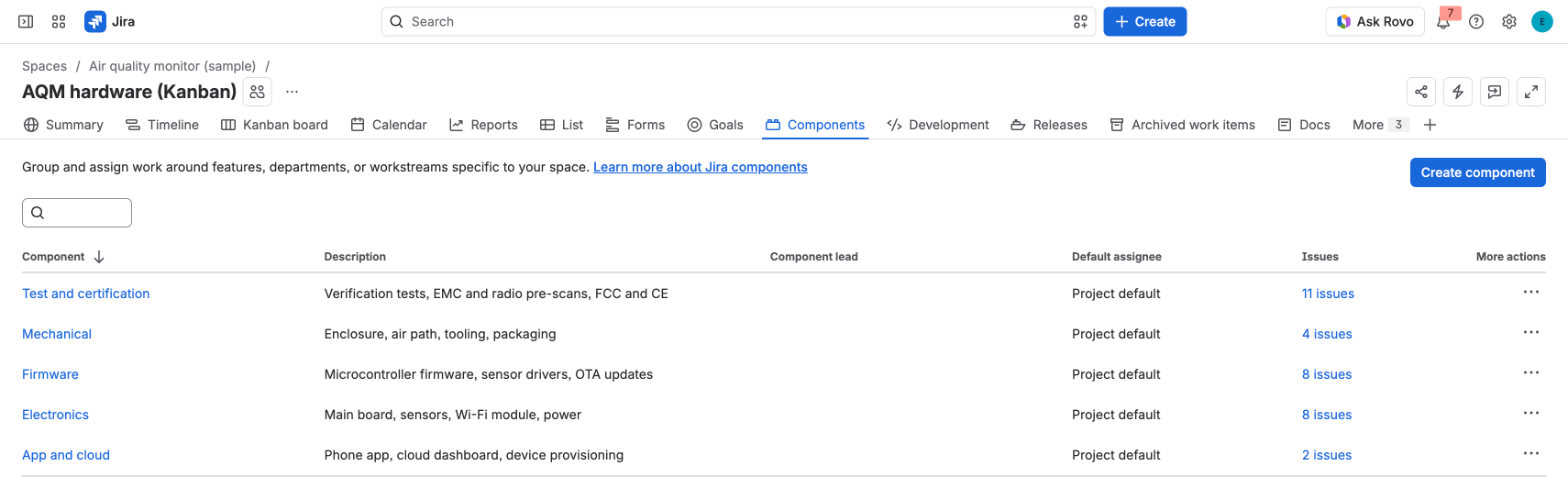 Example: five components, one per discipline, each with a one-line description.
2. A Kanban board for the hardware rhythm. Electronics, mechanical and test work moves in weeks: waiting on a board run, a tooling change or a lab slot. A Kanban board fits that, with no sprint to squeeze it into. Its board filter picks the disciplines:
project = AQM
AND component in (Electronics, Mechanical, "Test and certification")
AND issuetype not in (Epic, "Gate review")
ORDER BY Rank ASC
Swimlanes based on queries (component = Electronics, component = Mechanical, and so on) give each discipline its own row. Anything that matches no swimlane lands in a default lane at the bottom, which is a useful place to spot work nobody has sorted.
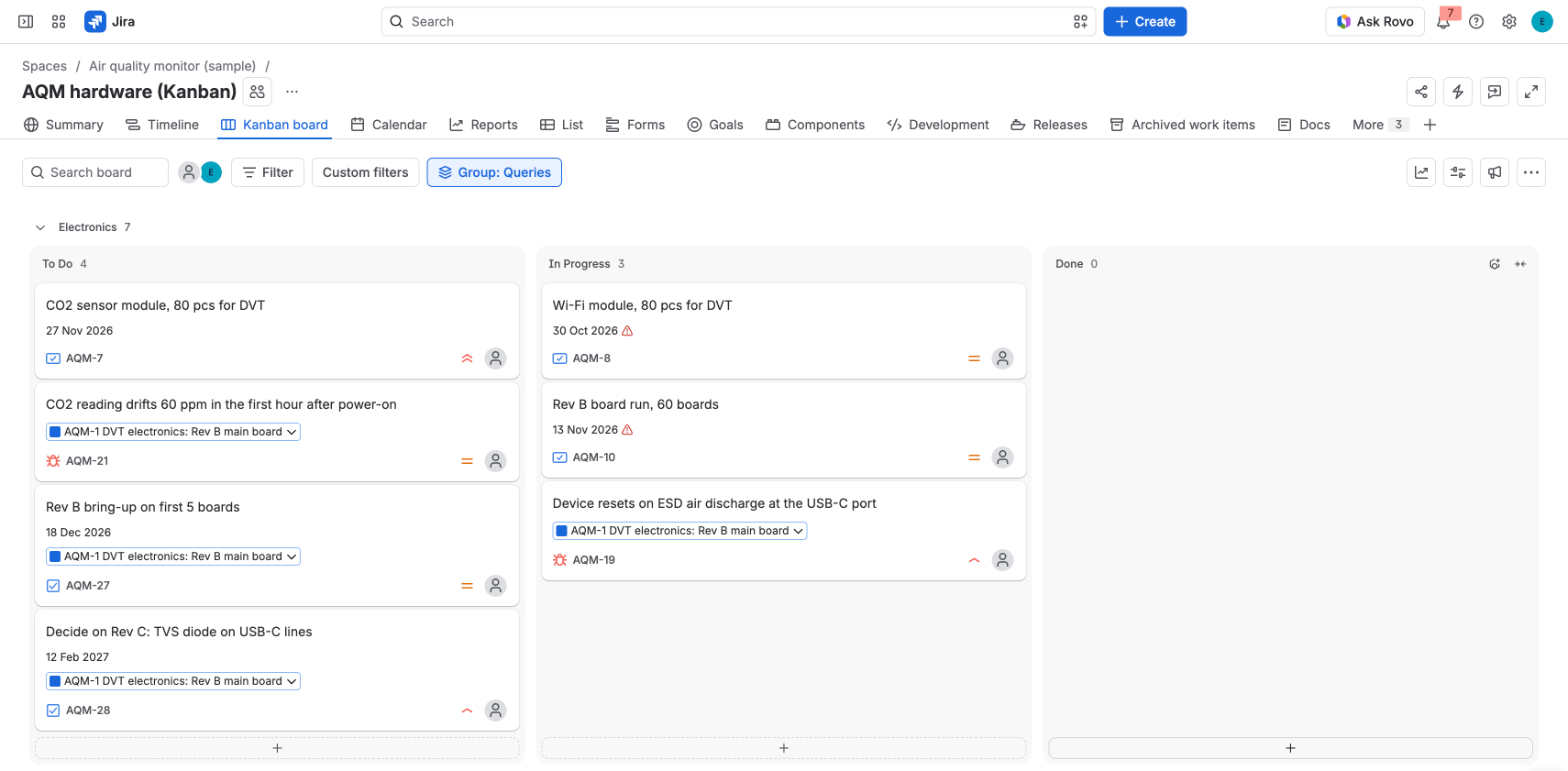 Example: the hardware board, one swimlane per discipline. Two part orders are past their dates and show a warning.
3. A Scrum board for firmware and app. Firmware and app work runs in two-week sprints, so it gets a Scrum board whose filter is component in (Firmware, "App and cloud"). Each sprint goal names the build it serves.
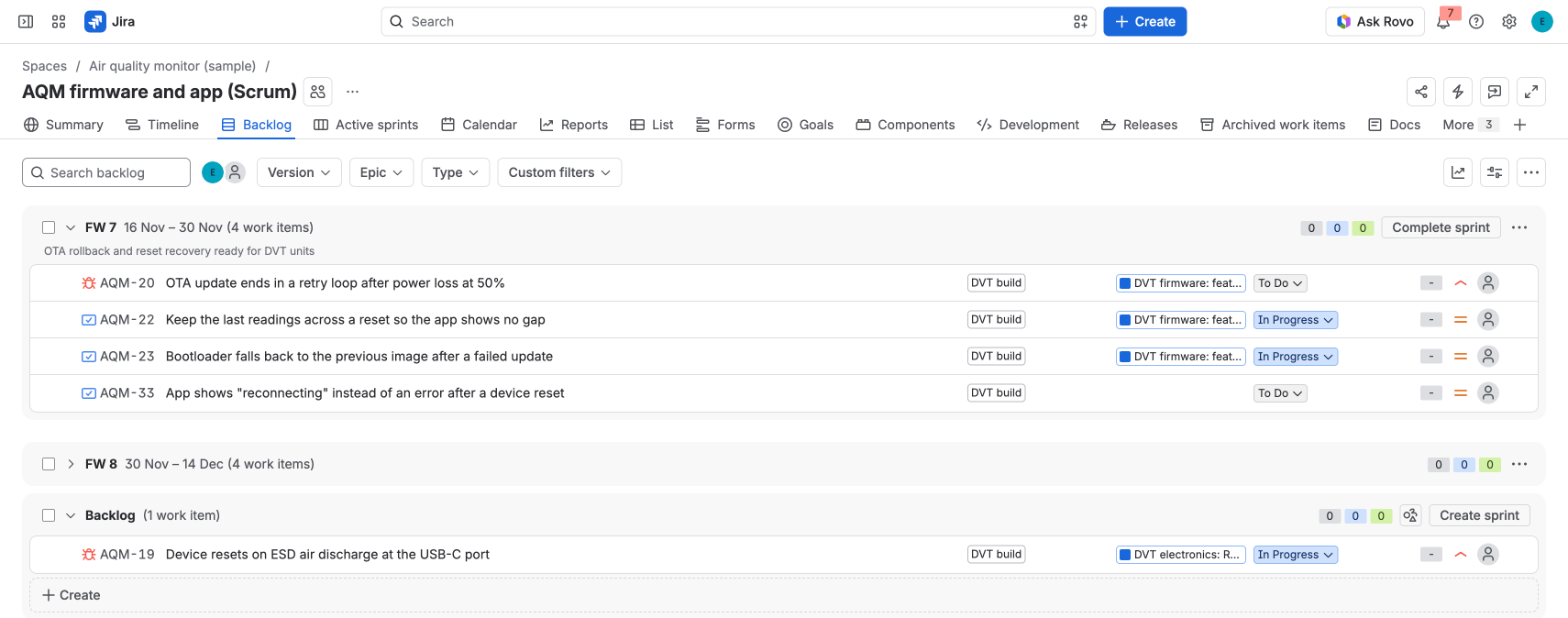 Example: the firmware and app board. The ESD reset bug carries both Electronics and Firmware, so it appears here and on the hardware board.
4. A workflow per kind of work, not per person. In a company-managed space, a workflow scheme lets each work type use its own workflow. A part order can go through “Ordered” and “Waiting on supplier” while a firmware story keeps To Do, In Progress and Done. One caution: when you add a status, map it to a column on every board that shows that work type. Atlassian’s documentation says work items in unmapped statuses are hidden from the board and the backlog.
5. The builds as releases, shared by every discipline. Each build (EVT, DVT, PVT) is a release, and every work item that must be ready for it carries that release, whatever its component. The space timeline then shows each discipline’s epic against the build dates, and Blocks links between epics are drawn as dependencies. The EVT, DVT and PVT guide covers this part in detail.
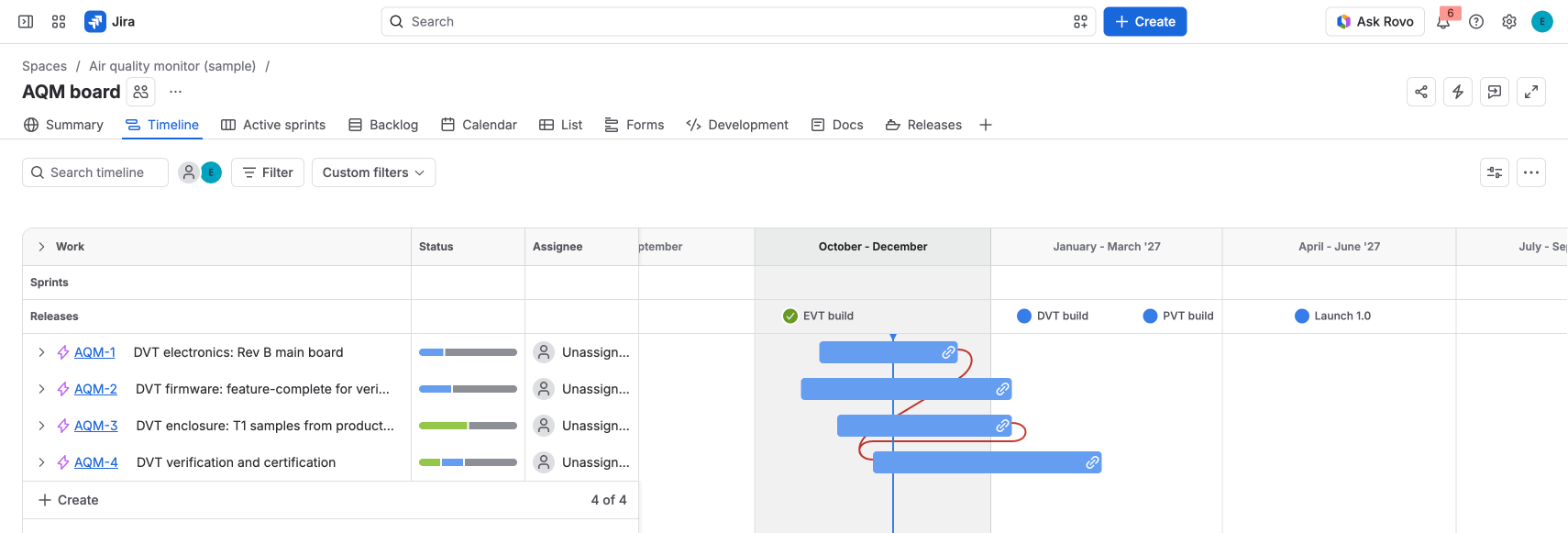 Example: one timeline for all disciplines. Red lines mark a dependency whose dates conflict.
How do you plan one build across disciplines?
A build is where the disciplines meet. Plan it backward from the build date, one hand-off at a time, and make every hand-off a link in Jira.
In our example, the DVT build needs three things from three disciplines by mid-January: Rev B boards from electronics, T1 enclosure samples from mechanical, and a firmware image for the contract manufacturer’s end-of-line test. Each one has a chain behind it:
- Mechanical: the 3D data for the changed air path is approved, then the tooling is changed, then T1 samples ship, then the fit check with a Rev B board runs.
- Electronics: the Rev B board run arrives, then bring-up on the first five boards, then a decision on a Rev C protection change.
- Firmware: temperature compensation for the new air path can only be tuned on T1 samples, so it waits on the mechanical chain.
Every arrow in that list is a Blocks link between two work items. The tooling change blocks the fit check, the drop test, the self-heating test and the firmware’s temperature compensation. When the tooling date moves, the work that waits on it is one search away, whatever discipline it belongs to.
Two rules keep this honest. First, a link means a real wait: “can’t start until”, not “related to”. Second, the date sits on the work that is waited for, so a slip is visible at its source. The supplier’s date on the tooling change is what moves; the four items it blocks show the impact.
How do you run the weekly cross-discipline review?
Each discipline runs its own stand-up or sprint. Once a week, the leads look at the build together, and Jira should answer the questions before the meeting starts.
What is waiting on something? This search lists every open work item for the next build that is blocked by another work item:
project = AQM AND fixVersion = "DVT build"
AND statusCategory != Done
AND issueLinkType = "is blocked by"
ORDER BY component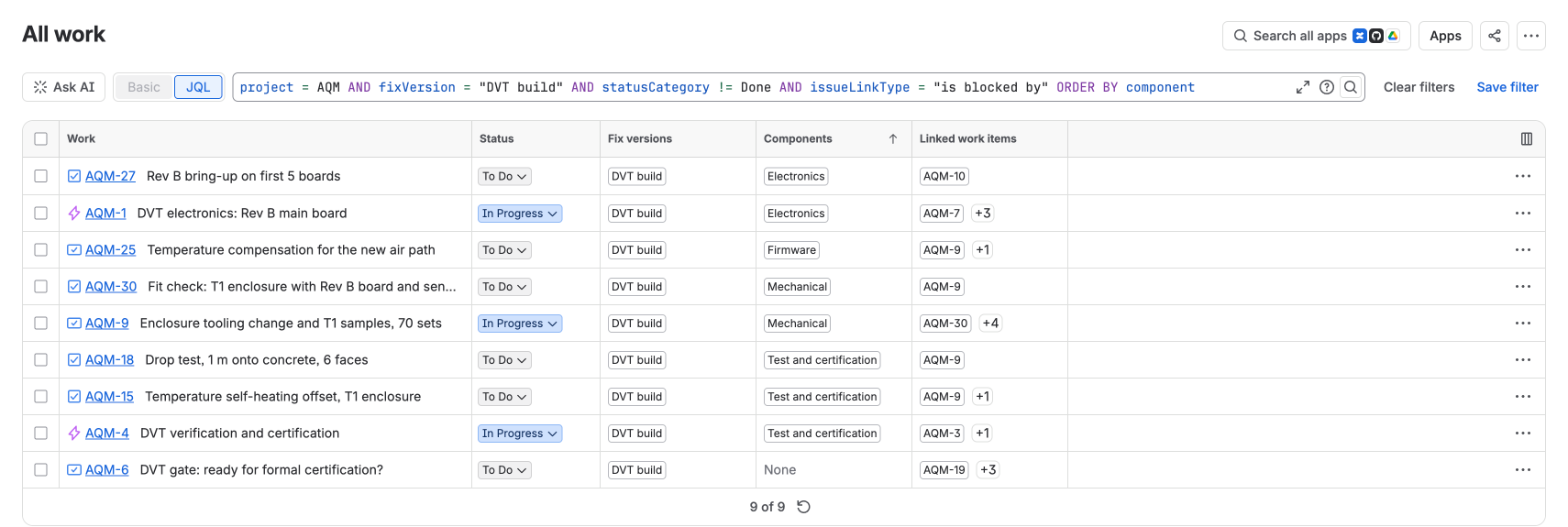 Example: open DVT work that waits on something, by discipline. The tooling change (AQM-9) appears as a blocker for mechanical, firmware and test work.
Which parts need ordering this week? If part orders carry an order-by date, this search shows the ones due in the next seven days or already late:
project = AQM AND issuetype = "Part order"
AND statusCategory != Done
AND "Order-by date" <= 7d
What hasn’t been sorted? project = AQM AND component is EMPTY shows work with no discipline. In our example it returns the two gate reviews, which is intended; anything else gets a component in the meeting.
Put the three searches on a dashboard and the agenda writes itself: blockers first, then parts, then anything unsorted. The decisions go back into Jira as dates, links or owners, not into the meeting notes.
How do you handle work that touches two disciplines?
Some problems belong to more than one discipline. In our example, the device resets when an ESD discharge hits the USB-C port. Electronics may add a protection diode on Rev C; firmware is working on a recovery that keeps the readings across a reset.
There are two good ways to hold that in Jira:
- One work item with two components, when one person owns the problem and the others contribute. It appears on both boards, and both leads see it in their own view. Our example uses this for the ESD bug.
- Two linked work items, when each discipline has its own piece of work with its own owner and date: the Rev C decision for electronics, the recovery story for firmware, linked to each other and to the bug.
What doesn’t work is one work item with one component, owned by the discipline that found the problem, while the other discipline tracks its part in a chat thread.
What goes wrong most often?
- The software setup is copied. Hardware work gets forced into two-week sprints, so it rolls over every sprint and the reports stop meaning anything.
- Disciplines are labels. Labels are free text, so the same discipline ends up with three spellings and the boards miss work.
- New statuses aren’t mapped. Someone adds “Waiting on supplier”, forgets the board columns, and the part orders vanish from the board.
- Dependencies live in people’s heads. The links aren’t there, so the timeline and the blocked-work search show nothing, and the weekly review becomes a round of status updates.
- Work has no component. Check
component is EMPTYat the weekly review and sort it on the spot.
How do you move an existing team to this setup?
Don’t rebuild everything at once. In our practice, a team gets there in three steps without stopping delivery:
- Design it on one page first: the components, the boards and their filters, the builds, the link types and the three review searches. Agree it with the discipline leads before anything is configured.
- Start with the next build, not the whole backlog. Give the work for that build its components, release and links; leave older work as it is.
- Review after 30 days. Check which boards people actually use, which statuses they skip and which links are missing, and fix the setup while it’s still cheap to change.
When is one space not enough?
Once disciplines sit in separate spaces, or several products share teams, the basic timeline can’t show the whole picture: it shows one space and draws only Blocks links within it. That is the point to use Plans, included in Jira Premium and Enterprise, or an app that reads across spaces. We build Gatecast for Jira for hardware milestones across spaces. When the timeline stops being enough is covered in Do you need Jira Plans, or is the timeline enough?
Sources
Atlassian documentation, checked 24 November 2026: What are Jira components?, Create a board based on filters, Configure swimlanes, Configure columns, What are Jira workflows?, What does the space timeline show?. The board filters, swimlanes, the two-component bug and every search in this guide were run on our sample space on 24 November 2026.
The Hardware Stage-Gate Readiness Check: 18 questions, about six minutes, your score right away.
Questions people ask
Should we use components or labels for the disciplines?
Components. A component is a fixed list a space admin maintains, with an optional lead and default assignee, so boards and filters can rely on it. Labels are free text: one person types firmware, another FW, and the board quietly misses work.
Does this work in a team-managed space?
Not as described. Atlassian's documentation says components are only available in company-managed spaces, and team-managed spaces don't support creating extra boards from within the space. Teams that plan several disciplines in one space usually need a company-managed space.
What if one work item belongs to two disciplines?
Give it both components. It then appears on every board whose filter includes either one. In our example, the bug where the device resets on an ESD discharge carries Electronics and Firmware and shows on both the hardware board and the firmware board. If the two disciplines each have their own piece of work, split it into two linked work items instead.
Should hardware work go into sprints too?
Usually not. Board runs, tooling changes and lab slots take weeks and depend on suppliers, so they roll over sprint after sprint and make the sprint reports meaningless. Keep them on a Kanban board and tie them to the build they serve; firmware and app teams keep their sprints.
How many boards should one space have?
As few as the rhythms you really have. Start with two: one for hardware work that flows in weeks, one for firmware and app work in sprints. A third board per discipline only helps when that discipline has its own lead who plans its work separately.